
🛠️ Tools #011 - SQL 05 - DQL deep dive - 1/3
Basic Querying, Filtering, Sorting & Aggregations

Hello folks,
Welcome back to Tools, Today we are going to learn concepts which an Analyst would be using for 80% of the times when using SQL.
In case you missed the previous edition, here you go -

Let’s get our dataset first…
In this edition we will use “CustomerComplaints” dataset which has the following columns -
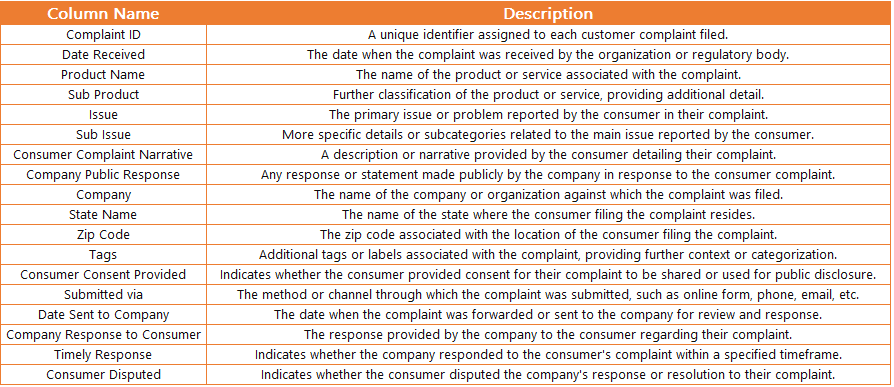
For data I generated 100 random data points using ChatGPT & uploaded it to postgreSQL. You can follow the previous editions to get step by step instructions to do the same -

Now that we have the data, let’s get querying -
Basic Querying
SELECT statement
The SELECT statement is the backbone of querying data in SQL. It allows you to retrieve data from one or more tables in your database.
Syntax -
SELECT column1, column2 FROM table_name;
Here's a breakdown:
SELECT: Indicates the beginning of the query.
column1, column2: Specify the columns you want to retrieve data from.
FROM: Specifies the table from which you're selecting data.
table_name: The name of the table you're querying.
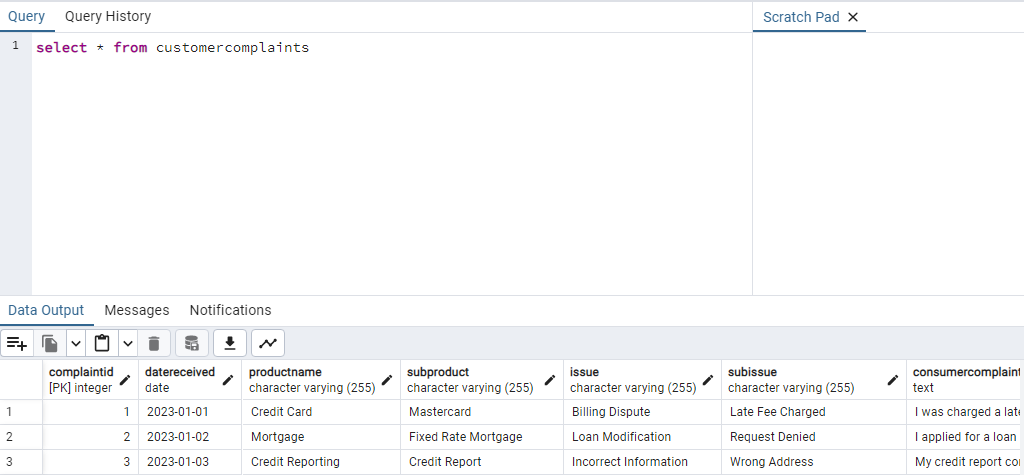
Using our complaints data, we can query the whole data by using -
SELECT * FROM customercomplaints;
Here’s the output -
DISTINCT keyword
The DISTINCT keyword filters out duplicate values from the result set. It ensures that each row returned by the query is unique.
Syntax -
SELECT DISTINCT column1, column2 FROM table_name;
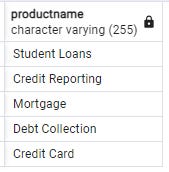
Suppose we want to find all unique product names from our customercomplaints table. We'd use the following query:
SELECT DISTINCT ProductName FROM customercomplaints;
& the output -
LIMIT keyword
The LIMIT clause is used to restrict the number of rows returned by a query. It's particularly useful when dealing with large datasets and wanting to retrieve only a subset of the results.
Syntax -
SELECT column1, column2 FROM table_name
LIMIT n;
Let's say we want to retrieve the first 10 complaints from our customercomplaints table. We'd use the following query:
SELECT * FROM customercomplaints
LIMIT 10;
OFFSET keyword
The OFFSET clause allows you to skip a specified number of rows before returning the remaining rows. It's commonly used in conjunction with the LIMIT clause to paginate through large result sets.
Syntax -
SELECT column1, column2 FROM table_name
LIMIT n OFFSET m;
Suppose we want to retrieve rows 11-20 from our customercomplaints table. We'd use the following query:
SELECT * FROM customercomplaints
LIMIT 10 OFFSET 10;
Data Filtering & Sorting
WHERE clause
The WHERE clause is used to filter rows based on specific criteria, allowing you to retrieve only the rows that meet certain conditions.
Syntax -
SELECT column1, column2 FROM table_name
WHERE condition;
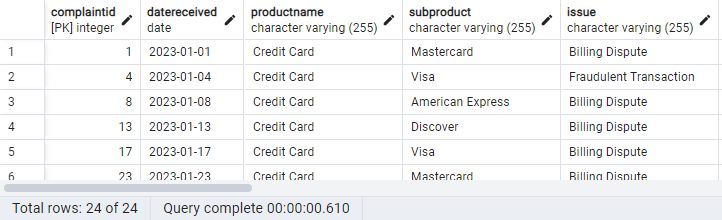
Suppose we want to retrieve all complaints where the product name is 'Credit Card'. We'd use the following query:
SELECT * FROM customercomplaints
WHERE ProductName = 'Credit Card';
Here’s the output of 24 lines where product is Credit Card -
Understanding comparison operators
Comparison operators are used to compare values in SQL queries, allowing you to create conditions for filtering data.
Common Comparison Operators:
= : Equal to
<> or != : Not equal to
< : Less than
> : Greater than
<= : Less than or equal to
>= : Greater than or equal to
Let's say we want to retrieve all complaints where the issue date is '2023-01-01'. We'd use the following query:
SELECT * FROM CustomerComplaints
WHERE DateReceived = '2023-01-01';
& the output -

Logical operators
Logical operators are used to combine multiple conditions in SQL queries, allowing you to create more sophisticated filtering criteria.
Common Logical Operators:
AND: Returns true if both conditions are true.
OR: Returns true if either condition is true.
NOT: Negates a condition.
Example:
Suppose we want to retrieve all complaints where the product is 'Credit Card' and the state is 'California'. We'd use the following query:
SELECT * FROM CustomerComplaints
WHERE ProductName = 'Credit Card' AND StateName = 'California';
BETWEEN operator
The BETWEEN operator is used to filter data within a specified range of values, inclusive of the endpoints.
Syntax -
SELECT column1, column2 FROM table_name
WHERE column_name BETWEEN value1 AND value2;
Suppose we want to retrieve all complaints received between Jan 1, 2023, and Feb 04, 2023. We'd use the following query:
SELECT * FROM CustomerComplaints
WHERE DateReceived BETWEEN '2023-01-01' AND '2023-02-04';
The BETWEEN operator is inclusive of the endpoints.
IN operator
The IN operator allows you to specify multiple values in a WHERE clause, making it easier to filter data based on various criteria.
Syntax -
SELECT column1, column2 FROM table_name
WHERE column_name IN (value1, value2, ...);
Suppose we want to retrieve all complaints related to ‘Billing Dispute'. We'd use the following query:
SELECT * FROM CustomerComplaints
WHERE issue IN ('Billing Dispute');
LIKE operator
The LIKE operator is used to search for patterns in string data, allowing you to perform wildcard searches.
Syntax -
SELECT column1, column2 FROM table_name
WHERE column_name LIKE pattern;
Common Wildcard Characters:
% : Matches zero or more characters.
_ : Matches exactly one character.
Suppose we want to retrieve all complaints where the product name starts with 'Credit'. We'd use the following query:
SELECT * FROM CustomerComplaints
WHERE ProductName LIKE 'Credit%';
IS NULL Operator
The IS NULL operator is used to filter rows where a column contains NULL values.
Syntax -
SELECT column1, column2 FROM table_name
WHERE column_name IS NULL;
Suppose we want to retrieve all complaints where the consumer complaint narrative is not provided. We'd use the following query:
SELECT * FROM CustomerComplaints
WHERE ConsumerComplaintNarrative IS NULL;
ORDER BY Clause
The ORDER BY clause is used to sort the result set of a query based on one or more columns.
Syntax -
SELECT column1, column2 FROM table_name
ORDER BY column1 [ASC|DESC];
Suppose we want to retrieve all complaints from the CustomerComplaints table and sort them by the date they were received in descending order. We'd use the following query:
SELECT * FROM CustomerComplaints
ORDER BY DateReceived DESC;
& here’s the output -
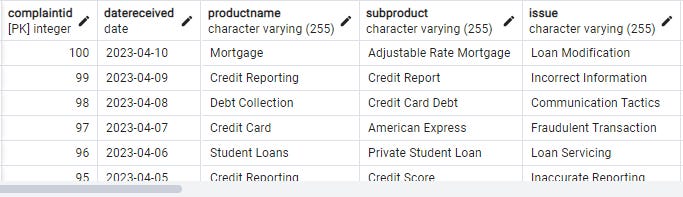
ASC (ascending) and DESC (descending) are keywords used in conjunction with the ORDER BY clause to specify the sorting order of query results.
Aggregations & Grouping
Aggregate functions perform calculations on a set of values and return a single value as a result. Some common aggregate functions include COUNT, SUM, AVG, MIN, and MAX.
Common Aggregate Functions:
COUNT: Returns the number of rows in a group.
SUM: Calculates the sum of values in a group.
AVG: Calculates the average of values in a group.
MIN: Returns the minimum value in a group.
MAX: Returns the maximum value in a group.
Syntax -
SELECT COUNT(column_name) FROM table_name;
Suppose we want to count the total number of complaints in our CustomerComplaints table. We'd use the following query:
SELECT COUNT(*) FROM CustomerComplaints;
You would ideally get 100 rows as the output.
GROUP BY Clause
The GROUP BY clause is used to group rows that have the same values into summary rows, typically to perform aggregate functions on each group.
Syntax -
SELECT column1, column2, aggregate_function(column3) FROM table_name
GROUP BY column1, column2;
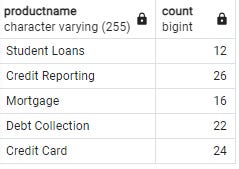
Suppose we want to count the number of complaints received for each product in our CustomerComplaints table. We'd use the following query:
SELECT ProductName, COUNT(*) FROM CustomerComplaints
GROUP BY ProductName;
Here’s the output -
HAVING Clause
The HAVING clause allows you to filter the results of aggregate functions applied to groups, similar to the WHERE clause for individual rows.
Syntax -
SELECT column1, aggregate_function(column2) FROM table_name
GROUP BY column1
HAVING condition;
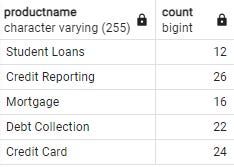
Suppose we want to find products with more than 5 complaints in our CustomerComplaints table. We'd use the following query:
SELECT ProductName, COUNT(*) FROM CustomerComplaints
GROUP BY ProductName
HAVING COUNT(*) > 5;
& here’s the output -
& that’s it for today!
Hope that the explanations were easy & clear enough for you. Let me know if something can be improved.
Next time we will start looking at Advanced querying options.
Until next edition,
Raghunandan 🎯
& If it’s your first time here, TheWeekendFreelancer currently has 5 ongoing series - Tools 🛠️, Maths 📈, Domain 🌐, Trends 📻 & My Notes 📝. Have fun reading!
P.S. - “The Weekend Freelancer” is a reader backed publication. Share this newsletter with your friends and relatives & consider becoming a free or paid member of this newsletter. Every subscription gives me an extra ounce of motivation to keep going 💪!
You can also support my work here. Cheers!